Overview
Before deploying or configuring ProWatch, it is important to understand how the platform is designed and how its different components work together.
ProWatch is built around a centralised management platform and a lightweight endpoint agent that work together to collect, process, and present workforce, device, and operational information. The platform is designed to help organisations gain visibility into workforce productivity, device health, work patterns, and operational performance while maintaining flexibility through configurable policies and integrations.
This document explains the architecture of ProWatch, its core components, how information flows through the platform, and the key concepts used throughout the documentation.
Architecture Overview
ProWatch follows a centralised architecture where managed devices communicate securely with a cloud-hosted management platform.
The endpoint agent installed on each managed device collects information based on the organisation's configuration and sends it to the ProWatch platform. The platform processes this information, applies organisational rules, calculates business metrics, and presents the results through dashboards, reports, and analytics.
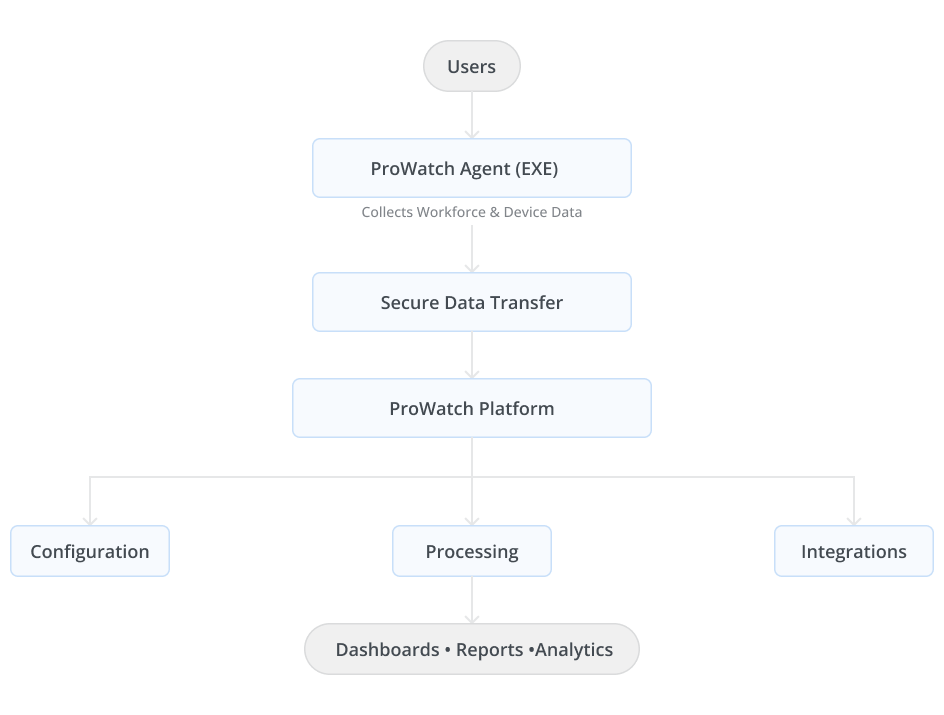
This architecture enables organisations to manage thousands of users and devices from a single platform while keeping organisational data isolated through multi-tenancy.
Core Components
ProWatch consists of several components that work together to deliver a unified experience.
ProWatch Agent
The ProWatch Agent is a lightweight application installed on supported endpoint devices.
Its primary responsibility is to collect operational information from the device and securely synchronise it with the ProWatch platform.
Depending on the organisation's configuration, the agent can collect:
- Device availability
- User login sessions
- Activity information
- Application usage
- Website usage
- Work modes
- Time records
- Device health information
- Screenshot data (if enabled)
- Geolocation data
- Device security events
The agent operates in the background with minimal impact on system performance and continues to function even when the device is temporarily offline. Data collected during offline periods is synchronised automatically when connectivity is restored.
ProWatch Web Console
The ProWatch Web Console is the centralised management portal used by administrators, managers, and authorised users.
The console provides access to all platform capabilities, including:
- User Management
- Device Management
- Productivity Insights
- Time Records
- Project Management
- Geolocation
- Geofencing
- Reports and Dashboards
- Configuration
- Integrations
- Security Policies
- Audit Logs
Role-based access ensures that users only see the information and functionality appropriate to their responsibilities.
Configuration Engine
The Configuration Engine controls how ProWatch behaves across the organisation.
Administrators can configure:
- Tracking mode
- Screenshot settings
- Work modes
- Application classification
- Productivity rules
- Security policies
- Shift schedules
- Holiday calendars
- Device policies
- Geofencing rules
Configurations can be applied at different levels depending on organisational requirements.
Analytics Engine
The Analytics Engine processes collected information and converts it into meaningful business insights.
It calculates various metrics such as:
- Productive hours
- Non-productive hours
- Active time
- Idle time
- Logged hours
- Productivity percentage
- Device compliance
- Application usage
- Workforce distribution
- Project utilisation
These metrics are presented through dashboards and reports.
Integration Hub
The Integration Hub enables ProWatch to exchange information with external enterprise systems.
Supported integrations include:
- Identity providers
- Microsoft Teams
- LDAP
- Attendance systems
- Tailgate systems
- Project management platforms
- HR systems
- REST APIs
- Webhooks
This allows organisations to incorporate ProWatch into their existing IT ecosystem without duplicating information.
Information Flow
The following sequence illustrates how information moves through ProWatch.
Step 1: User Login
The user signs in to a managed device where the ProWatch Agent is installed.
The agent authenticates the session and associates it with the appropriate user.
Step 2: Data Collection
Based on the configured policies, the agent collects operational information such as:
- Device status
- Activity level
- Application usage
- Website usage
- Work mode
- Location
- Device health
- Security events
Step 3: Secure Synchronisation
Collected information is securely transmitted to the ProWatch platform.
If the device is offline, the agent temporarily stores the information and synchronises it automatically once connectivity is restored.
Step 4: Data Processing
The platform validates and processes incoming information.
During processing, ProWatch:
- Associates information with the correct user
- Maps devices
- Applies productivity classifications
- Evaluates compliance rules
- Calculates KPIs
- Generates activity timelines
- Updates dashboards
Step 5: Insights and Reporting
Processed information becomes available through:
- Dashboards
- Reports
- Timesheets
- Device pages
- User profiles
- Team analytics
- Executive summaries
Core Concepts
The following concepts are used throughout the platform.
Tenant
A tenant represents an individual customer organisation using ProWatch.
Each tenant has its own:
- Users
- Devices
- Configurations
- Branding
- Reports
- Security policies
- Integrations
Tenant data is completely isolated from other organisations.
User
A user represents an individual employee or contractor assigned to ProWatch.
Users can:
- Sign in to the ProWatch Agent
- Generate work records
- Be assigned to teams
- Be mapped to one or more devices
- Work on projects and tasks
All activity within ProWatch is associated with the user rather than the device.
Device
A device is any supported endpoint that reports information to ProWatch.
Examples include:
- Laptops
- Desktops
- Shared workstations
Multiple users can share a device, and a user can work across multiple devices.
Team
A team is a logical collection of users used for:
- Reporting
- Productivity analysis
- Configuration inheritance
- Manager visibility
- Application classification
Teams simplify administration by allowing settings and policies to be applied to multiple users simultaneously.
Project
A project represents a collection of related work.
Projects can contain:
- Tasks
- Members
- Timesheets
- Budgets
- Milestones
- Analytics
Project information can be created directly in ProWatch or synchronised from external project management systems.
Work Mode
A work mode describes the type of work a user is performing during a specific period.
Examples include:
- General Work
- Meeting
- Call
- Training
- Travel
- Break
- Brainstorming
Work modes help provide additional context to time records and productivity analysis.
Productivity Classification
ProWatch classifies work activity into three categories:
- Productive – Activities that contribute directly to work objectives.
- Non-Productive – Activities not aligned with organisational work policies.
- Neutral – Activities that are neither explicitly productive nor non-productive.
Organisations can customise these classifications based on their business needs.
Geofence
A geofence is a virtual boundary created around a physical location.
Geofences enable organisations to:
- Detect entry and exit events
- Generate alerts
- Monitor location compliance
- Support workforce analytics
Compliance
Compliance represents how well users or devices adhere to organisational policies.
Examples include:
- Device compliance
- Application compliance
- Location compliance
- Security compliance
Compliance information is available throughout dashboards and reports.
Multi-Tenant Architecture
ProWatch is designed as a multi-tenant platform, enabling multiple organisations to use the same application while keeping their data and configurations completely separate.
Each tenant can independently configure:
- Branding
- Modules
- Features
- Productivity rules
- Screenshot policies
- Application classifications
- Tracking modes
- Security policies
- Data retention
- Integrations
This flexibility allows every organisation to tailor ProWatch to its operational and compliance requirements without affecting other tenants.
Security by Design
Security is integrated into every layer of ProWatch.
Key security principles include:
- Role-based access control (RBAC)
- Secure authentication
- Tenant data isolation
- Configurable security policies
- Audit logging
- Device-level security controls
- Encrypted communication between the agent and the platform
These measures help organisations maintain visibility while protecting workforce and organisational data.
Summary
ProWatch combines endpoint data collection, centralised management, configurable policies, and analytics into a single enterprise platform. Understanding these core concepts provides the foundation for the remaining documentation, where each module and feature is explained in greater detail.
